
Step 1 — Define your triggers
Triggers determine which people enter your lead pipeline. Two trigger types are available:New followers
Anyone who starts following any Instagram account you are targeting.
New likes
Anyone who likes any Instagram post you are targeting.
Step 2 — Daily AI analysis
Every day, Orsay’s AI automatically scans the new people who have activated your triggers.No manual action is needed on your end. The Lead Finder runs continuously and feeds your prospect table over time.
Step 3 — Set your filter
Define your ideal prospect profile by entering a filter in plain language. Filter examples:entrepreneur, male, under 40fitness coach, female, United Statesstartup founder, tech industry
Step 4 — Relevance score
For each new profile detected, the AI visits the person’s Instagram page and assigns a relevance score from 1 to 5.Profile analysis
The AI reviews the bio, posts, follower count, and all available signals on the public Instagram profile.
Comparison with your filter
The profile is compared against your filter to measure how well it matches your ideal prospect.
Step 5 — Qualified leads table
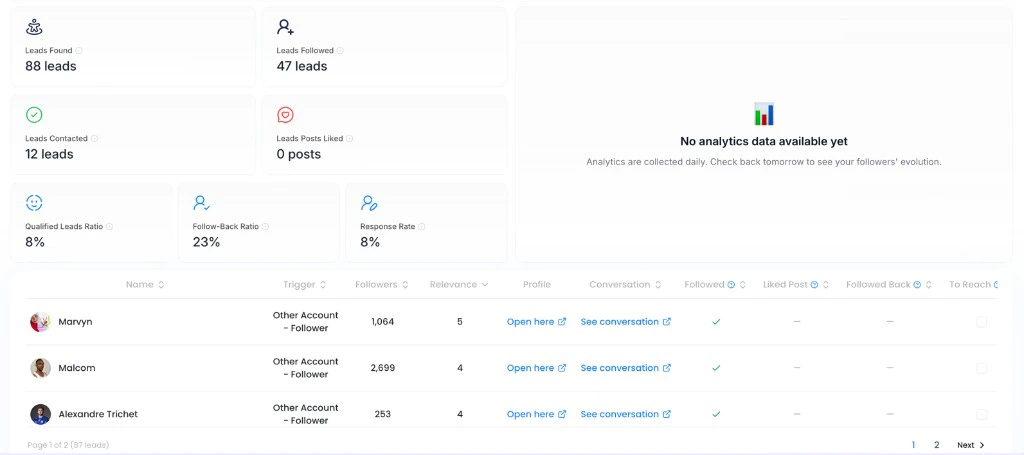
Check your leads table to get an at-a-glance view of all your prospects ranked by score. The table shows for each lead:| Column | Description |
|---|---|
| Profile | Name and direct link to the Instagram profile |
| Trigger | The action that brought the lead in (new follower / new like) |
| Score | Relevance score from 1 to 5 assigned by the AI |
| Source | The Instagram account or post being monitored |
Step 6 — Automate interactions
Once your leads are identified, you can directly automate interactions using Orsay outbound sequences — no need to link your Instagram account to the Lead Finder itself. To understand how to set up the sequences that power the Lead Finder, see Create Instagram outbound sequences.Need help setting up your Lead Finder? The Orsay support team is available on WhatsApp to assist you.