
Prompt advice
Below is a concise guide on how to craft effective prompts for generating your agent.💡 Tips for Writing Great Prompts
💡 Tips for Writing Great Prompts
- Be Specific
- Include clear, concise instructions.
- Focus on the exact goal or behavior you want from the agent.
- Provide Context
- Briefly describe your business, product, or service.
- Share any relevant background info so the AI can respond accurately.
- Use Plain Language
- Avoid unnecessary jargon or repetition.
- Write in short, direct sentences.
- Outline Key Points
- If there are multiple objectives or questions, list them clearly.
- This helps the AI structure its response.
- Offer Examples
- If you want a specific style (e.g., friendly, professional), give a sample sentence or two.
- Demonstrating your preferred tone guides the AI’s approach.
🛫 Quick Starter Recommendations
🛫 Quick Starter Recommendations
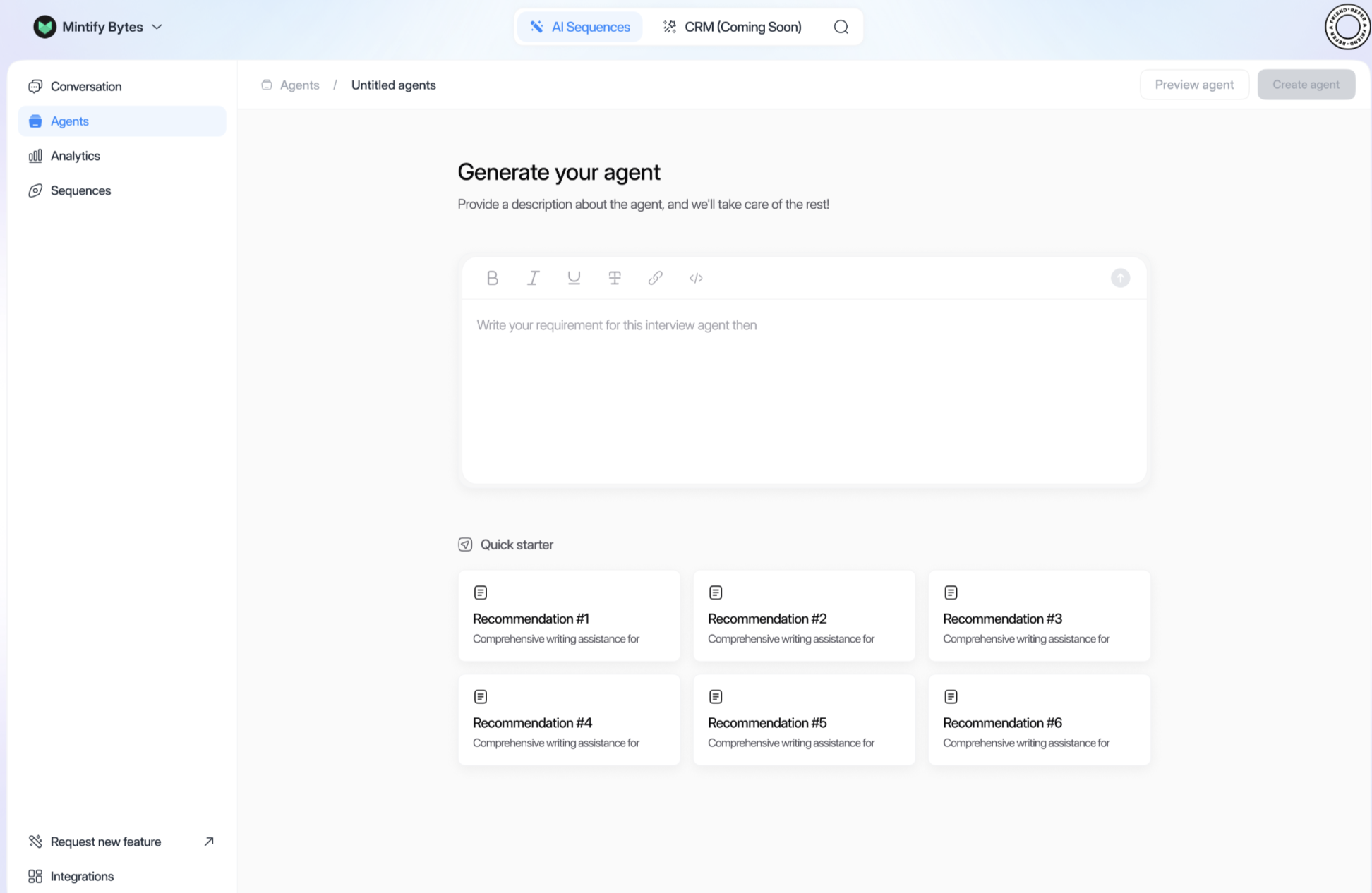
If you’re not sure where to begin, click on any of the Recommendation tiles
under “Quick starter.” Each tile contains a ready-to-use prompt outline
you can adapt to your needs.
🤖 Creating Your Agent
🤖 Creating Your Agent
- Write Your Requirement
- In the text box, describe your agent’s purpose, context, and desired tone.
- Optional: Use Quick Starter
- Select a pre-written prompt from the Quick Starter section to jumpstart your description.
- Preview Agent
- Click “Preview agent” to see how it will respond. Adjust your prompt if needed.
- Create Agent
- Once satisfied, click “Create agent” to finalize.
Creating your own Prompt
Below is a concise, direct guide on writing a prompt for a sales AI agent. Follow these best practices to ensure your agent asks the right qualifying questions, shares clear product information, and includes a call to action with a link.💪 Best Practices for Sales Agent Prompts
💪 Best Practices for Sales Agent Prompts
- Name Your AI Agent
- Start with a brief mention of who the agent is and its purpose.
- Example: “I’m creating a sales agent named Bella to promote our marketing software.”
- Include Brand & Product Details
- Provide important points about your company and what you’re selling.
- Example: “Our company, X-Mark Solutions, offers a cloud-based CRM platform to improve lead conversions.”
- Qualifying Questions
- Specify the questions you want the agent to ask to understand the prospect’s needs.
- Example:
- “What is your main sales challenge?”
- “How many leads do you typically manage per month?”
- “Are you interested in automating follow-up campaigns?”
- Call to Action Sentence
- Tell the agent to directly invite the prospect to take an action.
- Example: “Would you like to learn more about how our CRM can double your sales pipeline?”
- Confirmation with Link
- Provide a link for booking, signing up, or requesting a demo.
- Example: “Great! Please click this link to schedule a 15-minute demo: YourDemoLink.com.”
- Clear Requirements
- Use bullet points or short sentences to explain each step.
- Keep it straightforward and in a direct, sales-focused tone.
Putting It All Together
Putting It All Together
Sample Prompt (you can copy/paste and adjust):
“Create a sales AI agent named Bella for X-Mark Solutions. The agent should:
- Briefly introduce our cloud-based CRM and how it helps increase lead conversions.
- Ask 3-4 qualifying questions about the prospect’s current sales process.
- Use a direct call to action inviting the prospect to learn more.
- Provide a confirmation link for scheduling a demo: YourDemoLink.com.
- Maintain a clear, concise, and results-oriented sales tone throughout.”
- Paste your prompt into the text box.
- Preview agent to see the conversation flow.
- Refine if needed (e.g., adjust questions, tone, or CTA).
- Create your agent once satisfied.