> ## Documentation Index
> Fetch the complete documentation index at: https://docs.orsay.ai/llms.txt
> Use this file to discover all available pages before exploring further.
# 📝 Prompt
> See your conversations on Orsay
# Prompt advice
Below is a concise guide on how to craft effective prompts for generating your agent.
 1. **Be Specific**
* Include clear, concise instructions.
* Focus on the exact goal or behavior you want from the agent.
2. **Provide Context**
* Briefly describe your business, product, or service.
* Share any relevant background info so the AI can respond accurately.
3. **Use Plain Language**
* Avoid unnecessary jargon or repetition.
* Write in short, direct sentences.
4. **Outline Key Points**
* If there are multiple objectives or questions, list them clearly.
* This helps the AI structure its response.
5. **Offer Examples**
* If you want a specific style (e.g., friendly, professional), give a sample sentence or two.
* Demonstrating your preferred tone guides the AI’s approach.
{" "}
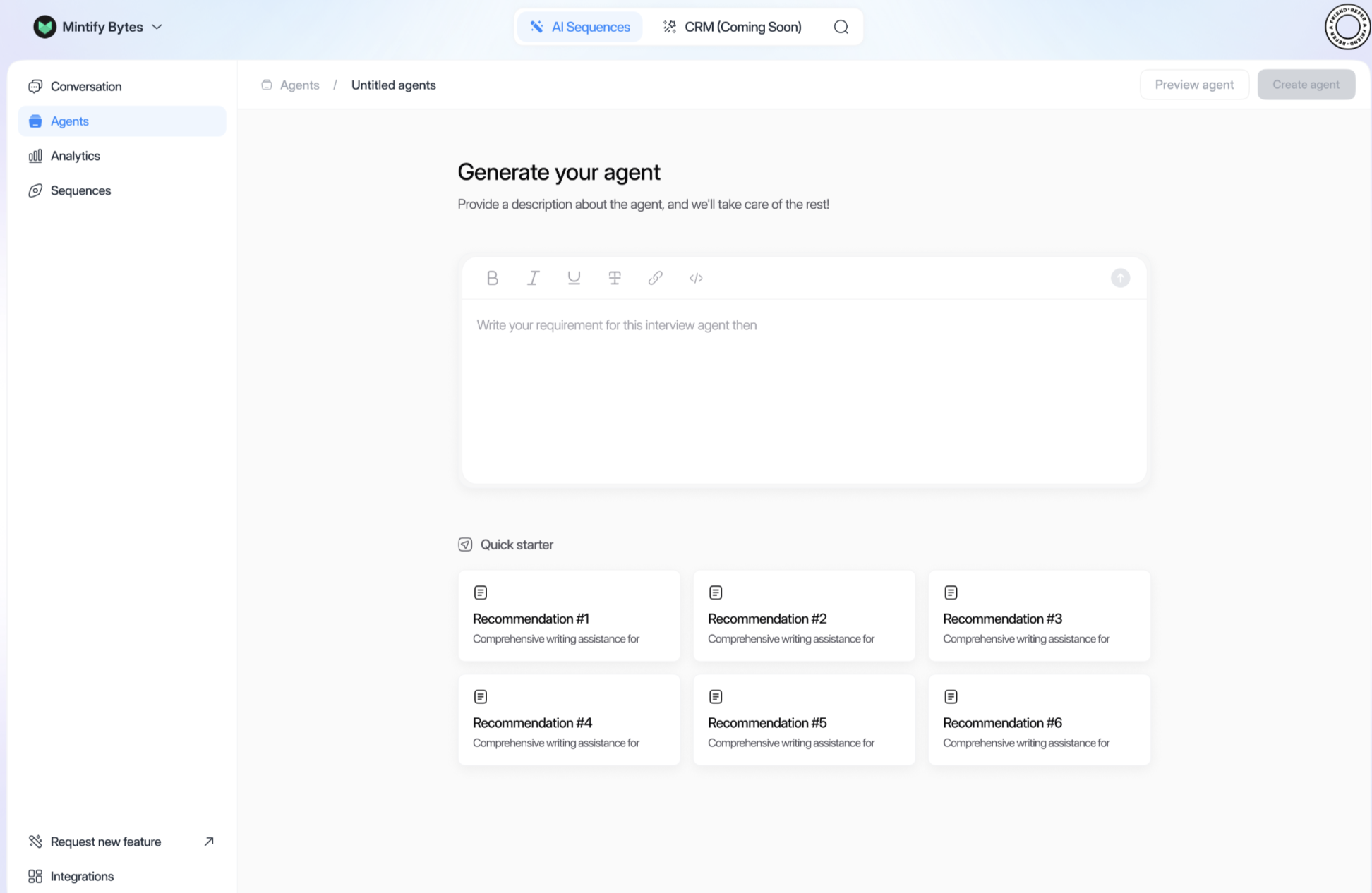
If you’re not sure where to begin, click on any of the Recommendation tiles
under **“Quick starter.”** Each tile contains a ready-to-use prompt outline
you can adapt to your needs.
1. **Write Your Requirement**
* In the text box, describe your agent’s purpose, context, and desired tone.
2. **Optional: Use Quick Starter**
* Select a pre-written prompt from the Quick Starter section to jumpstart your description.
3. **Preview Agent**
* Click **“Preview agent”** to see how it will respond. Adjust your prompt if needed.
4. **Create Agent**
* Once satisfied, click **“Create agent”** to finalize.
By following these guidelines, you’ll maximize the clarity of your prompts and ensure your AI agent engages leads effectively.
# Creating your own Prompt
Below is a concise, direct guide on writing a prompt for a sales AI agent. Follow these best practices to ensure your agent asks the right qualifying questions, shares clear product information, and includes a call to action with a link.
1. **Name Your AI Agent**
* Start with a brief mention of who the agent is and its purpose.
* Example: “I’m creating a sales agent named **Bella** to promote our marketing software.”
2. **Include Brand & Product Details**
* Provide important points about your company and what you’re selling.
* Example: “Our company, **X-Mark Solutions**, offers a cloud-based CRM platform to improve lead conversions.”
3. **Qualifying Questions**
* Specify the questions you want the agent to ask to understand the prospect’s needs.
* Example:
1. “What is your main sales challenge?”
2. “How many leads do you typically manage per month?”
3. “Are you interested in automating follow-up campaigns?”
4. **Call to Action Sentence**
* Tell the agent to directly invite the prospect to take an action.
* Example: “Would you like to learn more about how our CRM can double your sales pipeline?”
5. **Confirmation with Link**
* Provide a link for booking, signing up, or requesting a demo.
* Example: “Great! Please click this link to schedule a 15-minute demo: [**YourDemoLink.com**](https://yourdemolink.com/).”
6. **Clear Requirements**
* Use bullet points or short sentences to explain each step.
* Keep it straightforward and in a direct, sales-focused tone.
**Sample Prompt** (you can copy/paste and adjust):
> “Create a sales AI agent named Bella for X-Mark Solutions. The agent should:
>
> * Briefly introduce our **cloud-based CRM** and how it helps increase lead conversions.
> * Ask 3-4 **qualifying questions** about the prospect’s current sales process.
> * Use a direct **call to action** inviting the prospect to learn more.
> * Provide a **confirmation link** for scheduling a demo: [YourDemoLink.com](https://yourdemolink.com/).
> * Maintain a clear, concise, and results-oriented **sales tone** throughout.”
1. **Paste your prompt** into the text box.
2. **Preview agent** to see the conversation flow.
3. **Refine** if needed (e.g., adjust questions, tone, or CTA).
4. **Create your agent** once satisfied.
By following these guidelines, you’ll ensure your **sales AI agent** is set up to **qualify prospects**, clearly communicate **product benefits**, and **drive them** to the next step.
[📝 Here’s an example of a prompt you can use](/en/template_prompt)
1. **Be Specific**
* Include clear, concise instructions.
* Focus on the exact goal or behavior you want from the agent.
2. **Provide Context**
* Briefly describe your business, product, or service.
* Share any relevant background info so the AI can respond accurately.
3. **Use Plain Language**
* Avoid unnecessary jargon or repetition.
* Write in short, direct sentences.
4. **Outline Key Points**
* If there are multiple objectives or questions, list them clearly.
* This helps the AI structure its response.
5. **Offer Examples**
* If you want a specific style (e.g., friendly, professional), give a sample sentence or two.
* Demonstrating your preferred tone guides the AI’s approach.
{" "}
If you’re not sure where to begin, click on any of the Recommendation tiles
under **“Quick starter.”** Each tile contains a ready-to-use prompt outline
you can adapt to your needs.
1. **Write Your Requirement**
* In the text box, describe your agent’s purpose, context, and desired tone.
2. **Optional: Use Quick Starter**
* Select a pre-written prompt from the Quick Starter section to jumpstart your description.
3. **Preview Agent**
* Click **“Preview agent”** to see how it will respond. Adjust your prompt if needed.
4. **Create Agent**
* Once satisfied, click **“Create agent”** to finalize.
By following these guidelines, you’ll maximize the clarity of your prompts and ensure your AI agent engages leads effectively.
# Creating your own Prompt
Below is a concise, direct guide on writing a prompt for a sales AI agent. Follow these best practices to ensure your agent asks the right qualifying questions, shares clear product information, and includes a call to action with a link.
1. **Name Your AI Agent**
* Start with a brief mention of who the agent is and its purpose.
* Example: “I’m creating a sales agent named **Bella** to promote our marketing software.”
2. **Include Brand & Product Details**
* Provide important points about your company and what you’re selling.
* Example: “Our company, **X-Mark Solutions**, offers a cloud-based CRM platform to improve lead conversions.”
3. **Qualifying Questions**
* Specify the questions you want the agent to ask to understand the prospect’s needs.
* Example:
1. “What is your main sales challenge?”
2. “How many leads do you typically manage per month?”
3. “Are you interested in automating follow-up campaigns?”
4. **Call to Action Sentence**
* Tell the agent to directly invite the prospect to take an action.
* Example: “Would you like to learn more about how our CRM can double your sales pipeline?”
5. **Confirmation with Link**
* Provide a link for booking, signing up, or requesting a demo.
* Example: “Great! Please click this link to schedule a 15-minute demo: [**YourDemoLink.com**](https://yourdemolink.com/).”
6. **Clear Requirements**
* Use bullet points or short sentences to explain each step.
* Keep it straightforward and in a direct, sales-focused tone.
**Sample Prompt** (you can copy/paste and adjust):
> “Create a sales AI agent named Bella for X-Mark Solutions. The agent should:
>
> * Briefly introduce our **cloud-based CRM** and how it helps increase lead conversions.
> * Ask 3-4 **qualifying questions** about the prospect’s current sales process.
> * Use a direct **call to action** inviting the prospect to learn more.
> * Provide a **confirmation link** for scheduling a demo: [YourDemoLink.com](https://yourdemolink.com/).
> * Maintain a clear, concise, and results-oriented **sales tone** throughout.”
1. **Paste your prompt** into the text box.
2. **Preview agent** to see the conversation flow.
3. **Refine** if needed (e.g., adjust questions, tone, or CTA).
4. **Create your agent** once satisfied.
By following these guidelines, you’ll ensure your **sales AI agent** is set up to **qualify prospects**, clearly communicate **product benefits**, and **drive them** to the next step.
[📝 Here’s an example of a prompt you can use](/en/template_prompt)